
Renewals for Automatically Recurring Subscriptions
For automatically recurring subscriptions, there are several scenarios in which you may find yourself needing or wanting to renew your subscription. Each of these have been outlined below.
Active automatically recurring subscription
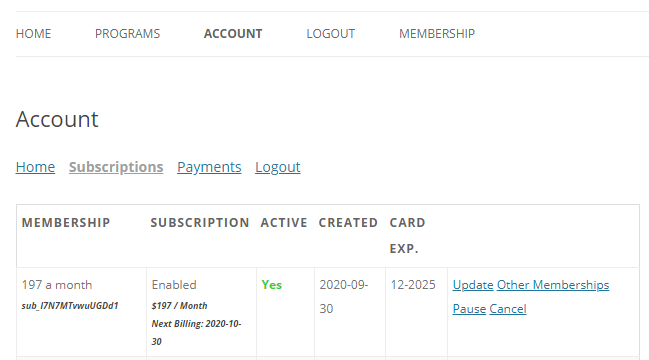
An automatically recurring subscription does not need to be renewed manually as it will automatically renew each set billing cycle. If you would like to know when your subscription is going to automatically renew, please login to your Account page and navigate to the Subscriptions tab where you will see an expiration date for your subscription. The expiration date listed there is the date your subscription will renew.
Lapsed recurring subscription
In this case, you have an automatically recurring subscription that has one or more completed payment(s), but that was not successfully billed at your last payment due date because of a lack of funds or expired credit card. In this case – our system will retry payment and if it fails your membership will automatically be cancelled. In the case that this happens, or your card details need updating, please sign up to the membership of your liking again. This will start a new membership for you from the date you re-sign up.
Cancelled Automatically Recurring Subscription
If you have cancelled your automatically recurring subscription and would like to have continued access to protected content, then you need to simply repurchase it. Remember, if you just cancelled your subscription, it may still be active for the remainder of the last billing period, and you must wait for that to expire before re-purchasing. If you would like to repurchase your subscription you can do one of the following:
• Login to the site and then navigate back to the registration page for that membership and signup again.
• Login to the site and go to the Account page > Subscriptions tab. Then, next to your old subscription, click the option that says, “Subscribe”. That will take you to the registration page for that membership.
Can I purchase through the site with my account?
Yes, all you need to do is go to the Memberships page (https://betterbodiesblackburn.co.uk/plans/) and choose the membership you like and press on the sign up link below the membership.
Once logged in you can also purchase items through our online store here: https://betterbodiesblackburn.co.uk/shop
How do I register?
Please go to this link https://betterbodiesblackburn.co.uk/plans/ to register by clicking sign up on the membership you’d like.
Our Memberships:
Monthly (Mixed area)
Women’s Monthly
Annual (Mixed area)
Women’s Annual
Personal Training
Custom Personal Training – Home Workouts / Meal Plans
How do I cancel my membership?
1. Log in to your site’s Account page – https://betterbodiesblackburn.co.uk/members-login/
2. Navigate to the Account page’s ‘Subscriptions’ tab.
3. Find the subscription that needs to be cancelled.
4. Click the ‘Cancel’ link to the right of that subscription.
5. Click ‘OK’ on the Pop-up after verifying the correct subscription has been selected.
Can I change my Payment date?
Unfortunately not, as the recurring monthly subscription will work from the day you signed up.
What’s the cancellation charge?
There is no cancellation charge! All our memberships are monthly rolling so you will still have access to your membership until it runs out if you cancel early. We do not give refunds for remaining days.
I have been charged again, why?
As stated on all our memberships, depending on which one you choose, they are recurring whether monthly, 6 monthly or yearly, this is also stated in the terms and conditions when signing up to the membership that you have to tick and accept you have read.
It is not our responsibility if you do not read these terms and refunds will not be given if you do not do your due diligence, this is clearly stated in our terms and conditions.